Thursday, January 6, 2011
NTFS Configaration Tool
No comments
:
Labels:
Ubuntu
 |
| Ntfs-config |
Then go to System>Administration> NTFS Configure Tool.
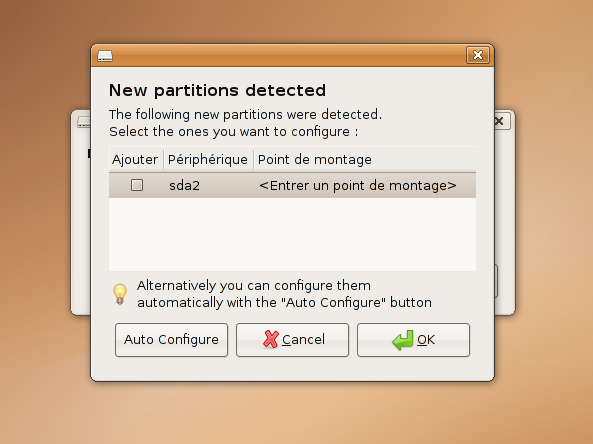
I select my NTFS drives manually and click OK.
But If you want your all NTFS drives to mount select Auto Configure.

Tick the two options give to read and write.Then close after you done.
Now when you start your computer your drives will be automatically mounted.
Why we need this to happen?
01.The main advantage is that we don't have to mount your drivers every time you log in to the system.This may seem easy but think if you have 10 NTFS drives??
02.If you have selected a wall paper from a unmounted drive it will not show.(Most of the time).Do you want to look empty desktop when you log in ?(Me No way).
Same will happen to audio files you play.They will not play from a play list till you mount them.
Now for a problem I have faced my self is that when we change the name of the Drive,there will be a problem when we start the OS.That they say to mount the drives as they are no longer in the same name they are now.
The solution is the remove the entry.To do so we must log in to the system.(Manually mount the drive for now at the start).Then go to the terminal and type
sudo gedit /etc/fstabEnter your password and this will open a Text file that with all the entries.
It will have lines like
#Entry for /dev/sda1 :and anther line below it.This may change from the numbers of drives you have mounted.Find your old drive name in such line followed by /media/
Then comment that entire line by adding a # in-front of the line.Save and close.Next time you restart that message will no longer show to you.If you want to mount it on start, use the NTFS Configuration Tools Again as above.

Wednesday, July 21, 2010
How to install LAMP and configure phpMyadmin
No comments
:
Labels:
Ubuntu

1)Go to terminal and type
$ sudo apt-get install lamp-server^Enter the password for the user.
It will ask a password for mysql.Give a password you desire.
2)Then install phpyyadmin;
$ sudo apt-get install phpmyadminIt will asked for automatic configure in the install but most of the time this is not working perfectly.So to do this manually,follow this
$ gksudo gedit /etc/apache2/apache2.confEnter the password for the user.
Add the following line to the text file that will come.
Include /etc/phpmyadmin/apache.conf
3)Restart apache by ;
$ sudo /etc/init.d/apache2 restartor (works for Ubuntu 10.04)
$ sudo service apache2 restart You can access phpmyadmin via a web browser;
http://localhost/phpmyadmin
Subscribe to:
Posts
(
Atom
)


