Randika's Blog

Somethings out of my mind

  • home

Thursday, January 6, 2011

NTFS Configaration Tool

Posted by Unknown at 5:44 PM Labels: Ubuntu
Share this
Tweet
Ntfs-config
 When you install your Ubuntu you will need to mount your NTFS formatted drives in Ubuntu automatically.This small but powerful software help to do so.You can use Synaptic Package Manager to install.Search for "ntsf-config".(For Ubuntu 10.10 also install "hal" from the list).
Then go to System>Administration> NTFS Configure Tool.
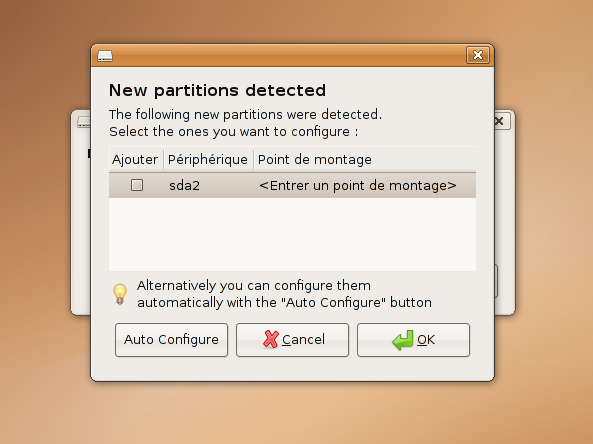
A window will pop up saying that New partitions detected.
I select my NTFS drives manually and click OK.
But If you want your all NTFS drives to mount select Auto Configure.

Tick the two options give to read and write.Then close after you done.
Now when you start your computer your drives will be automatically mounted.

Why we need this to happen?
01.The main advantage is that we don't have to mount your drivers every time you log in to the system.This may seem easy but think if you have 10 NTFS drives??

02.If you have selected a wall paper from a unmounted drive it will not show.(Most of the time).Do you want to look empty desktop when you log in ?(Me No way).
Same will happen to audio files you play.They will not play from a play list till you mount them.


Now for a problem I have faced my self is that when we change the name of the Drive,there will be a problem when we start the OS.That they say to mount the drives as they are no longer in the same name they are now.
The solution is the remove the entry.To do so we must log in to the system.(Manually mount the drive for now at the start).Then go to the terminal and type

sudo gedit /etc/fstab


Enter your password and this will open a Text file that with all the entries.
It will have lines like

#Entry for /dev/sda1 :

and anther line below it.This may change from the numbers of drives you have mounted.Find your old drive name in such line followed by /media/
Then comment that entire line by adding a # in-front of the line.Save and close.Next time you restart that message will no longer show to you.If you want to mount it on start, use the NTFS Configuration Tools Again as above.
Newer Post Older Post

No comments :

Post a Comment

Subscribe to: Post Comments ( Atom )

Email updates

 Subscribe in a reader

Popular Posts

  • 04 New Project with Angualr cli
  • How to install LAMP and configure phpMyadmin
    LAMP is a collection of software collection that can be used to make a Server inside your PC.This is a one way to check you website before...
  • 03Spring boot Setup github project
  • Android icon Resizer.
    When you want to develop android applications,you need images in different sizes for different device display densities. By using this ...
  • 06.Install Angular material
  • Eclipse (or any other derive IDE) unable to start.
    When I wanted to start my development in Spring Suite Tools, I got this message saying that I have not installed my JDK. But when I run, ...
  • 07.Angular routing and lazy loading
  • 05.Angular CLI proxying to the Spring boot backed.
  • 02.REST API with Spring Data Rest
  • Install NodeJs,npm,bower,yoeman,grunt without sudo
    Node.js® is a platform built on Chrome's JavaScript runtime for easily building fast, scalable network applications. Node.j...

Facebook page

Google +

Blog Archive

  • 2017 ( 6 )
    • September ( 6 )
  • 2014 ( 4 )
    • September ( 2 )
    • August ( 2 )
  • 2011 ( 1 )
    • January ( 1 )
      • NTFS Configaration Tool
  • 2010 ( 1 )
    • July ( 1 )

Blog Archive

  • ►  2017 ( 6 )
    • ►  September ( 6 )
  • ►  2014 ( 4 )
    • ►  September ( 2 )
    • ►  August ( 2 )
  • ▼  2011 ( 1 )
    • ▼  January ( 1 )
      • NTFS Configaration Tool
  • ►  2010 ( 1 )
    • ►  July ( 1 )

Followers

Randika Hapugoda @ Media Soft. Powered by Blogger.

Labels

  • Android ( 1 )
  • Bower ( 1 )
  • Eclipse ( 1 )
  • Grunti ( 1 )
  • Image Magic ( 1 )
  • Java ( 1 )
  • NodeJs ( 1 )
  • Spring ( 1 )
  • sts ( 1 )
  • Ubuntu ( 5 )
  • Yoeman ( 1 )

Popular Posts

  • 04 New Project with Angualr cli
  • How to install LAMP and configure phpMyadmin
    LAMP is a collection of software collection that can be used to make a Server inside your PC.This is a one way to check you website before...
  • 03Spring boot Setup github project
  • Android icon Resizer.
    When you want to develop android applications,you need images in different sizes for different device display densities. By using this ...
  • 06.Install Angular material
  • Eclipse (or any other derive IDE) unable to start.
    When I wanted to start my development in Spring Suite Tools, I got this message saying that I have not installed my JDK. But when I run, ...
  • 07.Angular routing and lazy loading
  • 05.Angular CLI proxying to the Spring boot backed.
  • 02.REST API with Spring Data Rest
  • Install NodeJs,npm,bower,yoeman,grunt without sudo
    Node.js® is a platform built on Chrome's JavaScript runtime for easily building fast, scalable network applications. Node.j...

© Randika's Blog 2014 . Powered by Blogger templates and RWD Testing Tool